Setting Up a Data Competition Environment in the Agentic Coding Era
This article was automatically translated from Japanese by AI.
I recently participated in a data competition (atmacup#23), which prompted me to build a competition environment suited for the Agentic Coding era. While my competition results were underwhelming, I personally felt the potential of Agentic Coding and also identified some clear challenges.
In this post, I’ll share the experimentation environment I built for this competition.
Philosophy of Collaborating with Agents
When delegating the bulk of analysis and coding to an Agent, I aimed for the following three goals:
- Structuring the overall workflow and creating commands/skills that let the Agent execute without hesitation, enabling rapid plan/execute/evaluate cycles
- Maintaining documentation to support the Agent’s decision-making
- Eliminating shared components as much as possible to remove inter-experiment dependencies, ensuring standalone reproducibility
As things stand, an Agent is an entity that “knows everything and can do everything, but won’t suggest or do anything unless a human tells it to.” This means humans must provide high-level direction and decisions, along with guardrails to steer the Agent toward intended behavior. The goal is to do everything possible to let the Agent run at full speed. If that’s not happening, it’s entirely the human’s fault.
It’s also important to clearly separate what humans review from what they don’t. What humans review is abstract information like experiment design and results; what they don’t review is concrete information like experiment code and configuration details. Having humans review code is essentially micromanagement. You need to resist that urge and limit yourself to asking the Agent things like “What parameters did this experiment use? What’s the rationale?” while focusing on controlling the overall flow. You might wonder what happens if the Agent makes a mistake, but it’s more accurate than me writing code by hand or visually scanning through config files. I’ve concluded that it’s better to focus on whether the experiment direction is correct, whether anything has been overlooked, and whether multiple changes were made at once—making results harder to interpret.
Directory Structure
Let’s look at the specific directory structure and the details of each component. For this competition, I eventually settled on the following layout.
  competition_name/
  ├── CLAUDE.md              # Agent configuration file
  ├── .claude/               # Claude Code settings (commands/skills/hooks, etc.)
  ├── experiment_summary.md  # Experiment results list & lineage diagram
  ├── experiments/           # Experiments directory
  │   └── expXXX/            # Each experiment (XXX increments from 001)
  │       ├── config.yaml    # Experiment configuration
  │       ├── run.py         # Execution script
  │       ├── result.md      # Experiment results evaluation document
  │       └── submission.csv # Submission file
  ├── docs/                  # Documentation
  │   ├── official/          # Official competition documents
  │   ├── paper/             # Papers (output from docling)
  │   └── survey/            # Technical surveys (Deep Research results)
  ├── data/                  # Datasets
  │   ├── raw/               # Provided data
  │   └── processed/         # Preprocessed data
  ├── app/                   # Visualization app
  │   ├── backend/           # Backend implementation with FastAPI
  │   └── frontend/          # Frontend implementation with React/Next.js
  ├── src/                   # Shared utilities (e.g., evaluation function implementations)
  ├── scripts/               # Experiment-independent scripts (e.g., preprocessing)
  ├── studies/               # Exploratory / verification code
  └── pyproject.toml         # uv configuration (package management)
CLAUDE.md, .claude: Claude Code-Related Files
For this competition, all analysis and experimentation was done by delegating to Claude Code. CLAUDE.md contains the competition overview, how to set up experiments, and how to run them via commands. Under .claude/, commands and skills encapsulate slightly complex multi-step tasks like experiment evaluation and documentation.
You don’t need to get everything perfect from the start. As you collaborate with the Agent, whenever you notice something feels off, you can have the Agent itself update these files. By repeating this process, you can gradually steer toward the intended behavior.
experiments/: Experiment Management
Data competitions involve extensive trial and error, so experiment management and reproducibility are paramount. For each experiment, I create a new directory called expXXX, which contains everything needed for the experiment to be self-contained: training code, metadata, intermediate files, and submission files. When running multiple similar experiments with different parameters, I use a variants directory with the same structure.
  experiments/expXXX/
  ├── config.yaml       # Experiment configuration
  ├── run.py            # Execution script
  ├── result.md         # Experiment results evaluation document
  ├── features/         # Intermediate files, etc.
  │   ├── train_features.npy
  │   └── test_features.npy
  └── variants/
      ├── expXXX_001/   # Variant 1
      │   ├── config.yaml      # Variant-specific configuration
      │   ├── run.py           # Copied from parent
      │   ├── predictions/
      │   └── submission.csv
      ├── expXXX_002/   # Variant 2
      └── ...
In the experiment configuration config.yaml, I include information about the experiment itself in addition to the parameters used. By recording which experiment it was derived from and what the intent was—essentially the diff from the previous experiment—the experiment’s position in the overall lineage becomes clear. All of this is created by the Agent, and humans only review it during the review phase.
# Example config.yaml
experiment:
  name: exp003
  description: "EigenPlaces model/dim/k grid search"

lineage:
  parent: exp001
  status: active
  diff_summary: "Grid search: model/dim/k combinations"
experiment_summary.md: Experiment Summary
As the number of experiments grows, the context the Agent needs to read also increases. So after each experiment, I have the Agent update experiment_summary.md at the project root. It contains:
- Experiment lineage diagram
- Overview table of each experiment with CV scores, LB scores, etc.
- Key findings from experiments
- Changelog (to record what was done and when)
At the top of this document, I create an experiment lineage diagram in mermaid format for visualization. This makes the experiment lineage easy to understand, and even when working on multiple experiments in parallel, I never lost track of where I was.
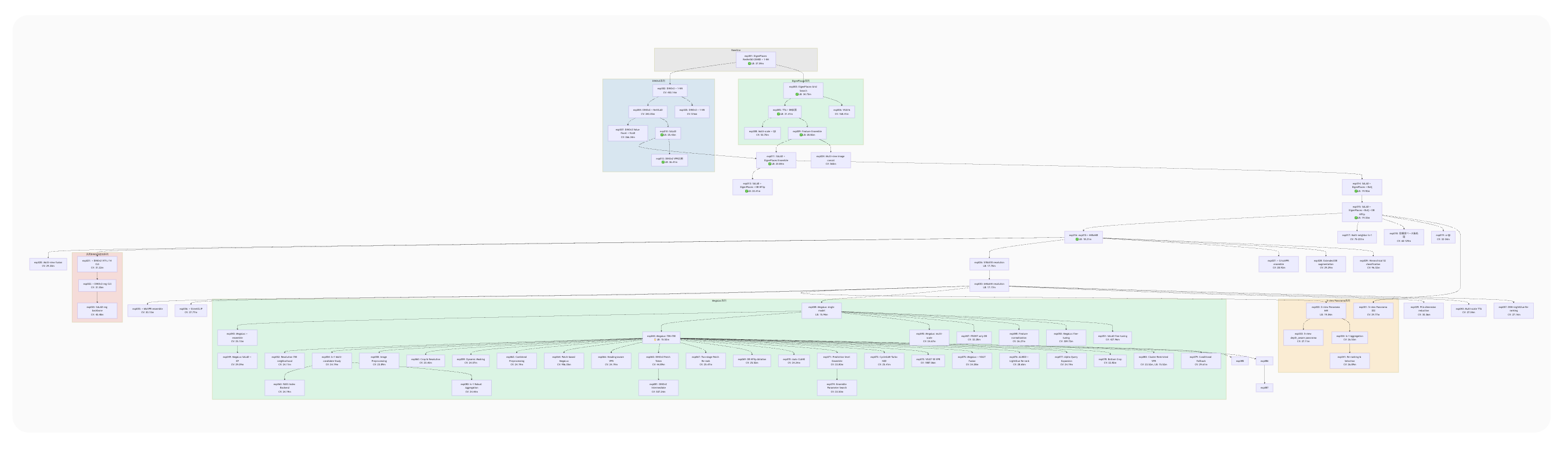
By the way, the large green section in the center represents the trial and error after applying the MegaLoc model. From that point, accuracy improvements were hard to come by—a large number of related experiments branched off from the same experiment, and most of them didn’t pan out.
docs/: Documentation
This directory contains documents that the Agent reads when building experiments.
-
official: This is where official competition documents such as rules and evaluation methods are placed. Only critical information like evaluation methods is written directly inCLAUDE.md; details like the list of provided files and specific rules are referenced here as needed. -
paper: Papers are placed here in Markdown format for the Agent to read. I set it up so that docling can be run from the CLI, and the Agent fetches papers from the internet on its own. -
survey: This is where reports created with Deep Research features from ChatGPT, Claude, and similar tools are placed. Since this part isn’t automated, I manually download the files and place them here, then have the Agent rename them. These survey files can also accumulate significantly, so I have the Agent extract only the competition-relevant information into asummary.mdto compress the context.
  docs/
  ├── official/                    # Official competition documents
  │   ├── rule.md                  # Rules & data description
  │   ├── evaluation.md            # Evaluation metric details
  │   └── *.pdf                    # Official slides
  │
  ├── paper/                       # arXiv papers converted to Markdown
  │   ├── README.md                # Paper index
  │   └── XXXX.XXXXXvX.md          # Paper text (arXiv ID)
  │
  └── survey/                      # Technical surveys (from Deep Research)
      ├── summary.md               # Survey summary
      ├── 01_vpr_comprehensive.md
      ├── 02_competition_solutions.md
      ├── 03_geolocalization_methods.md
      ├── ...
      └── XX_depth_panorama_synthesis.md
app/: Visualization / Analysis Application
Now that we can delegate all kinds of implementation to Agents, it has become much easier to build custom visualization and analysis applications. Since Streamlit can be cumbersome for page management and quickly hits limitations with visualization methods, I use a standard web application architecture with FastAPI and React.
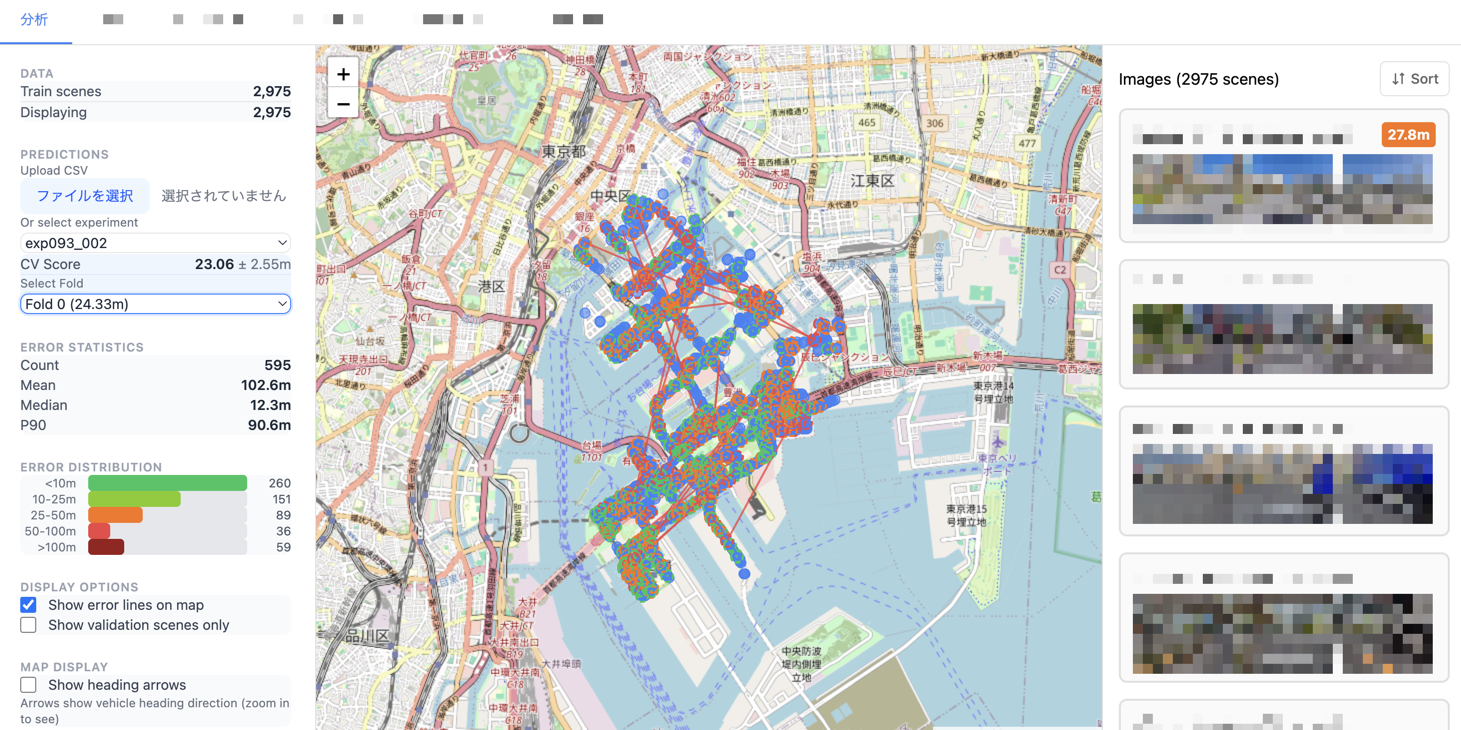
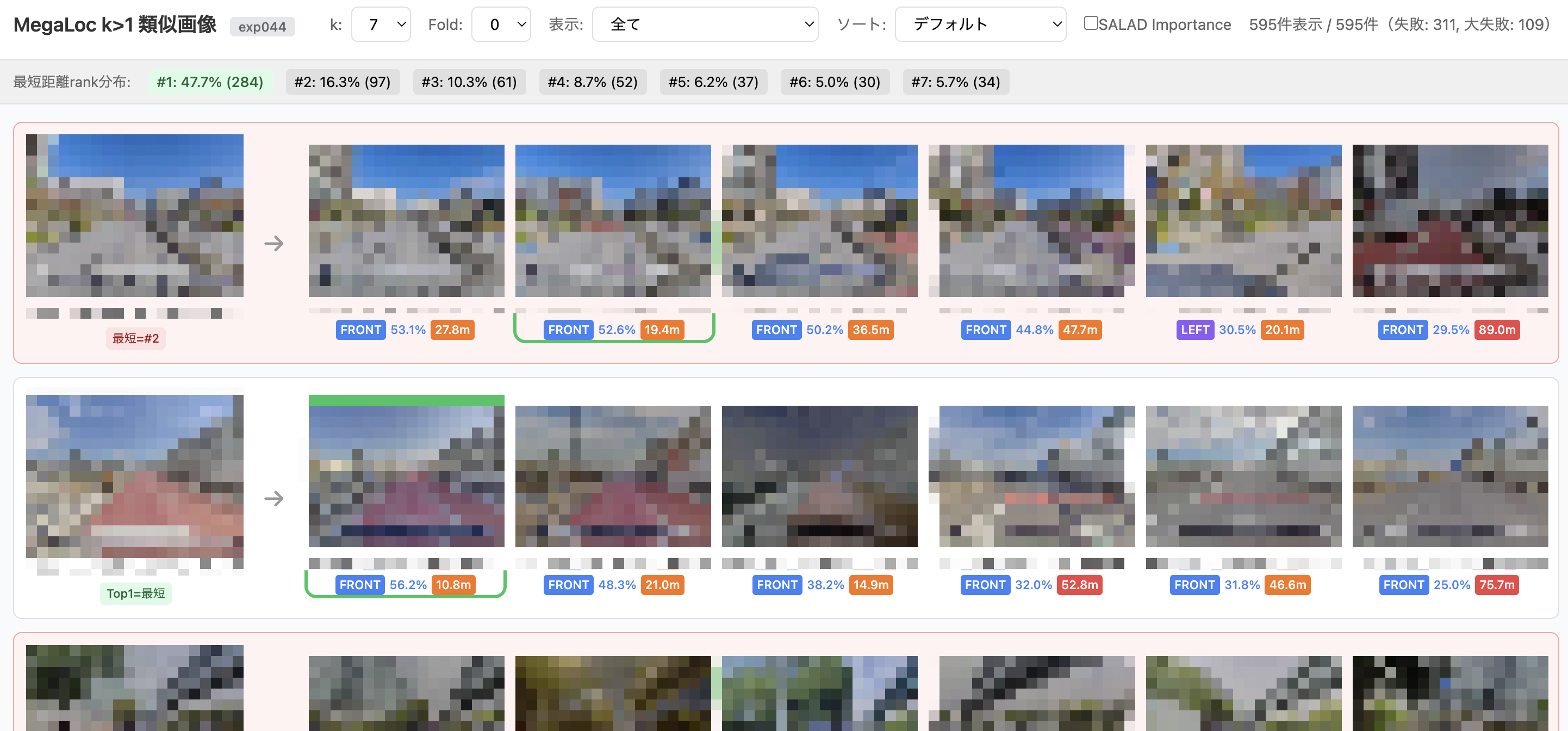
As an example, here are some visualization screens I built for this competition.
CV Results Visualization Screen for Each Experiment
Evaluation Screen for kNN (k>1)
Future Directions
In this competition, I had the Agent write all the code while I focused on higher-level decision-making—thinking about experiment plans and determining the next direction. While I was able to try experiments at a speed that would have been unimaginable before, human-side bottlenecks also became quite apparent, such as struggling to interpret the results the Agent produces and needing time to build technical understanding in the first place.
Things I haven’t tried yet include:
- Achieving a fully Agent-driven experiment evaluation cycle
- Multi-Agent collaboration (Codex and other LLMs)
- Managing experiment ideas through tickets with automatic verification by Agents
- Diagrams to aid human understanding (e.g., image generation with Nano Banana Pro)
We’re still far from a hands-off, fully automated state. To pursue more autonomous and efficient competition strategies, I feel that humans need to continue experimenting and upgrading their own capabilities.